GAME SETUP
Arrange battlefield and deploy units.
A
B
C
1
2
3
Sitrep Deck
Gear
TBD
Solo tabletop command board
Rules and play reference
Battlespace, created by Robert Salters, is an ultra-modern military tabletop wargame focused on solo and cooperative tactical combat. You control a four-man elite fireteam—such as Navy SEALs, Delta Force, or SAS—sent into hostile combat zones to complete high-stakes missions.
This digital adaptation brings Robert Salters’ tabletop game to the browser, handling much of the movement, combat, terrain, Orders, and game-state tracking while preserving the tactical decision-making of the original game.
Battlespace is played on a 36" × 36" digital battlefield. In this digitized variant, Soldiers, Enemies, Civilians, Vehicles, terrain, and other battlefield pieces are represented by tokens on the map. Tokens, Vehicles, Buildings, terrain, and other battlefield objects are proportioned to the 36" × 36" battlefield, allowing their relative size and placement to represent the physical scale of the game.
Most actions are performed by selecting or right-clicking a token. The available commands depend on the type of token, its current status, the phase of the game, and what actions it is allowed to perform.
The game tracks many rules automatically, including movement distance, Orders, shooting modifiers, wounds, elevation, cover, activation status, and several special conditions.
When you begin a new game, Battlespace opens in the Setup Phase. During Setup, you will assemble your Fire Teams, select the enemy forces, and construct the battlefield before play begins.
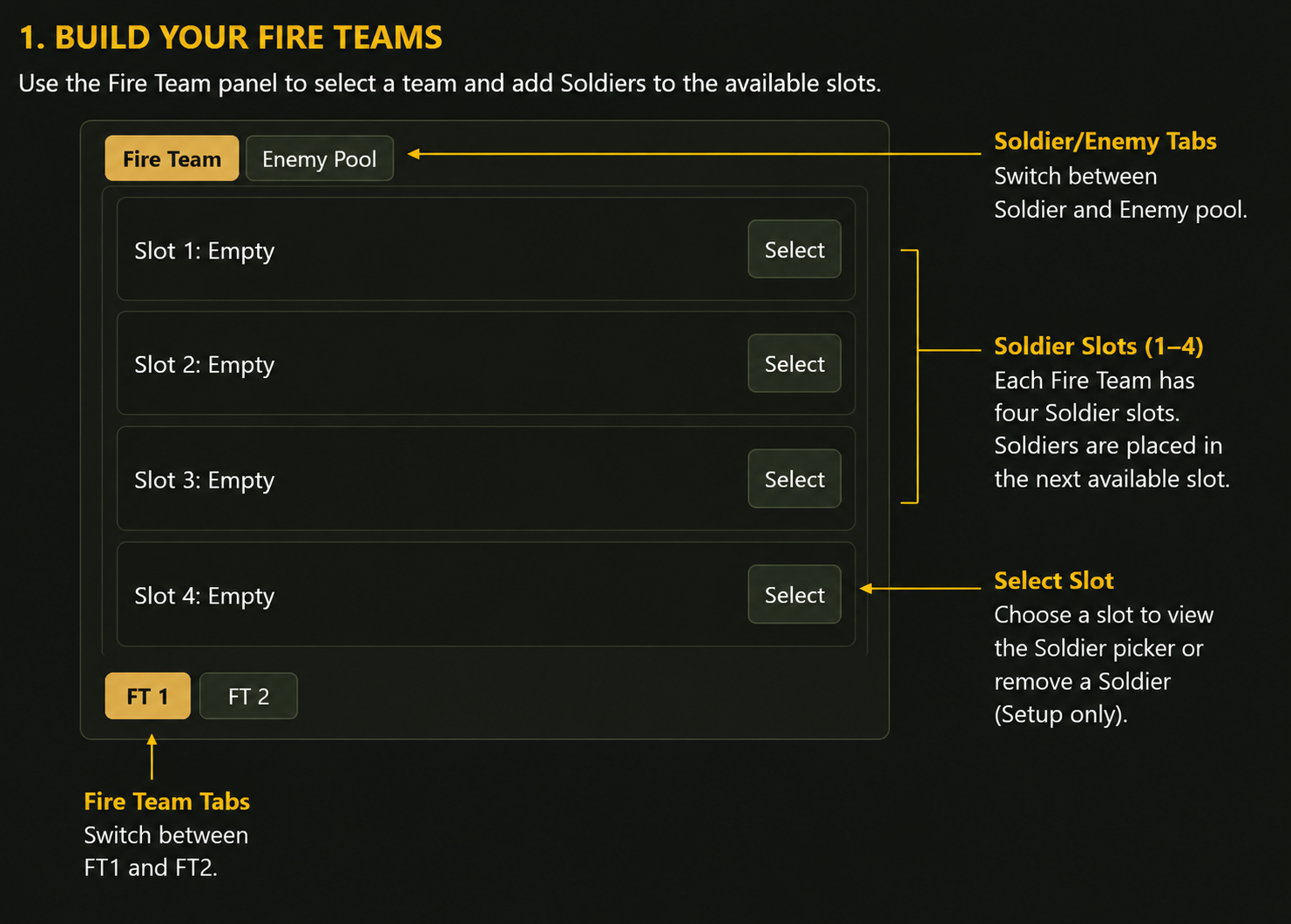
Battlespace supports two Fire Teams: FT1 and FT2. Each Fire Team has four Soldier slots.
A new game begins with both Fire Teams empty. Select the Fire Team you want to work with, then add Soldiers to it. Soldiers are placed into the next available slot in that Fire Team, and the same Soldier cannot be assigned to both teams.
Continue until you have assembled the Fire Teams required for your mission.
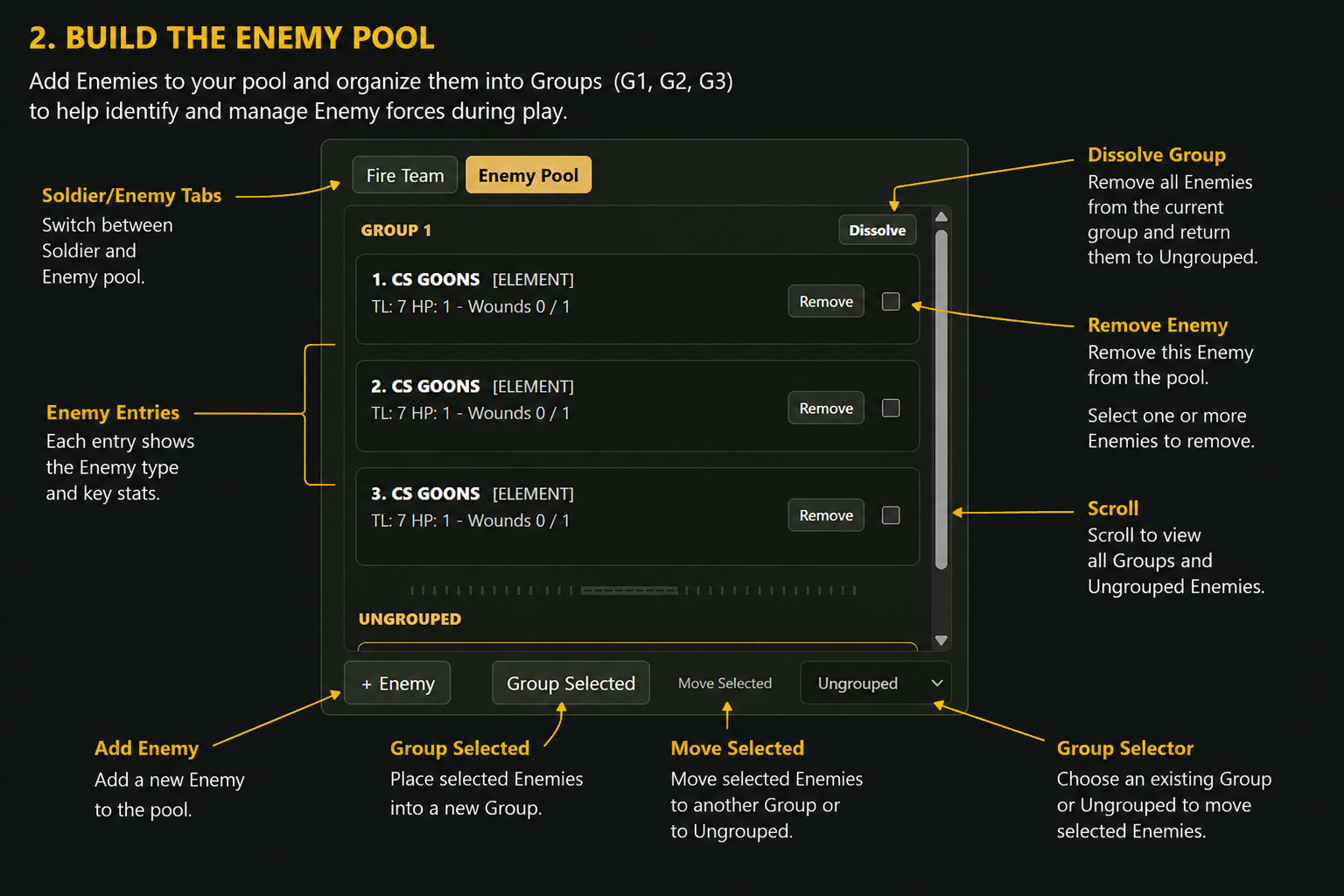
A new game also begins with an empty Enemy Pool.
Add the Enemies required for the mission. When selecting an Enemy, you can add more than one of the same type before confirming your selection.
Enemies may also be organized into Groups such as G1, G2, and G3. Groups are provided to help you organize and identify Enemy forces during play; assigning an Enemy to a group does not by itself change its combat abilities or activation rules.

Under Add to Battlefield, you can construct the battlefield using four Setup tools:
+ Map - Select the map that will serve as the battlefield background. Only one map is used at a time; selecting another replaces the current background.
+ Vehicle - Select one or more Vehicles to place on the battlefield. Vehicles use their preset dimensions and are treated as H1.5 terrain.
+ Building - Select one or more Buildings and place them on the battlefield.
+ Object - Create other terrain features and battlefield objects. Objects can be positioned, rotated, resized, and assigned an elevation from H0 to H3.
Map, Vehicle, Building, and Object controls are available during Setup and are hidden once the game begins.
During Setup, Unlock All is enabled by default. This allows you to position and adjust the battlefield before play begins.
Move and arrange Soldiers, Enemies, Vehicles, Buildings, and Objects as required by the mission. Generic Objects can also be resized and assigned the appropriate height.
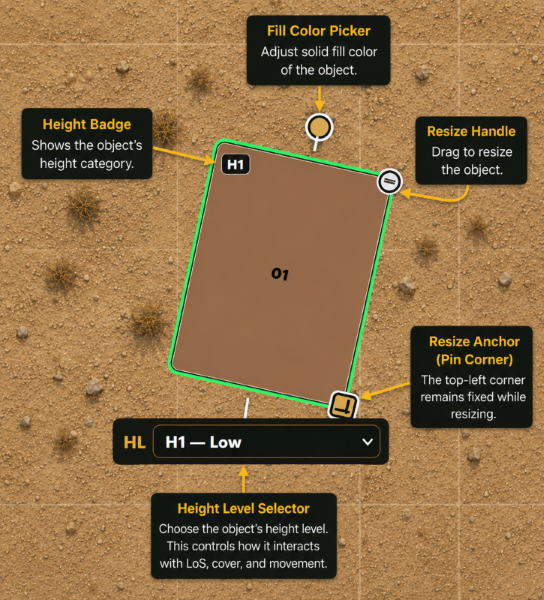
The battlefield height categories are:
| Height | Description |
|---|---|
| H0 | Negligible |
| H1 | Low |
| H1.5 | Chest High |
| H2 | Human High |
| H3 | Tall |
Vehicles are always H1.5 and Buildings are always H3 - these do not require a height setting.
Right click on empty areas of the map will bring up the options to add Civilian and Movement Card - this is also available during the game. Movement Card is meant as a visual aid to determine movement and throwing distances. Civilian behaviors will be implemented in the future.
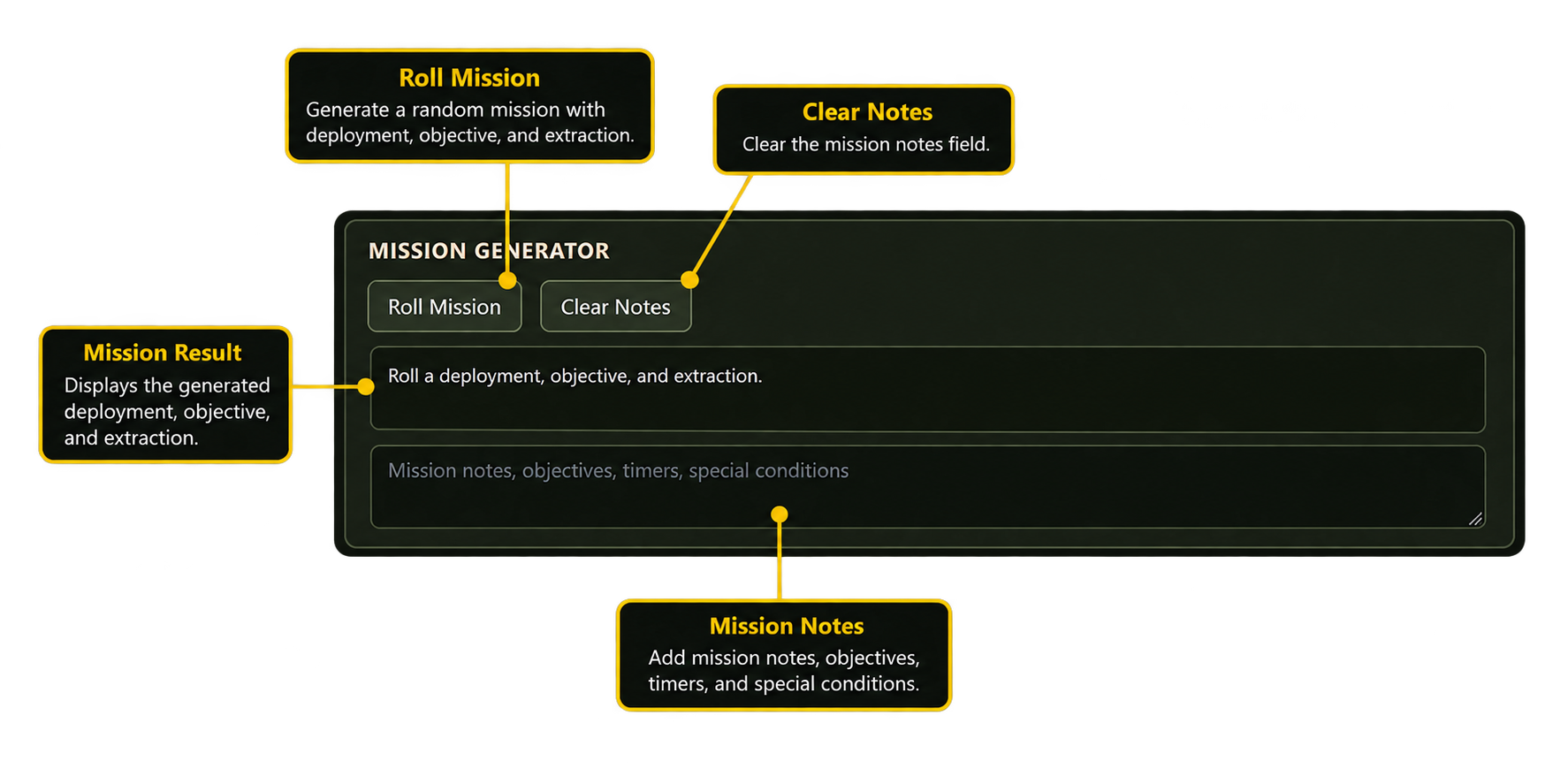
The Mission Generator is available during Setup to assist with creating the mission. It disappears once the game begins. This will be expanded in the future.
Before starting, make sure your Fire Teams, Enemy Pool, battlefield map, terrain, and starting positions are ready.
Select Start Game when setup is complete.
Battlespace locks the normal battlefield setup, hides the Setup-only construction tools, and begins:
Round 1 - Player Phase
From this point forward, movement and actions should normally be performed through the game's Orders and activation systems rather than by manually arranging the battlefield.
Each round proceeds through three main phases:
PLAYER → SITREP → ENEMY → START NEXT ROUND
During the Player Phase, each available Soldier receives an opportunity to activate.
During the Sitrep Phase, draw and resolve a Sitrep card. Sitrep effects may cause Enemies to move, shoot, activate, or perform other actions. Sitrep resolution is currently a largely manual process, with the player following the instructions on the card and performing the required actions. As the digital version of Battlespace develops, more Sitrep effects will be automated.
During the Enemy Phase, resolve the remaining Enemy activations for the round.
After the Enemy Phase is complete, begin the next round.
Current Round/Phase Information can be viewed above the map

TBD